Compass
At Nulsen Primary School, we use Compass Education as our main communication and attendance system.
Compass allows families to stay connected with the school, access important information, and manage their child’s attendance — all in one place.
How to access
Compass can be accessed in two easy ways:
On your phone or tablet:
Download the Compass School Manager app from the App Store or Google Play
Search for Nulsen Primary School
Log in using your Compass username and password
On a computer:
Select Nulsen Primary School and log in
If you need help accessing your account, please contact the school office — we’re always happy to assist.
What you can do
Compass is designed to make everyday school communication simple and accessible.
Through Compass, you can:
Notify the school of your child’s absence
View your child’s attendance history
Receive important school updates and messages
Provide consent for excursions and events
Update your contact details
Attendance made easy
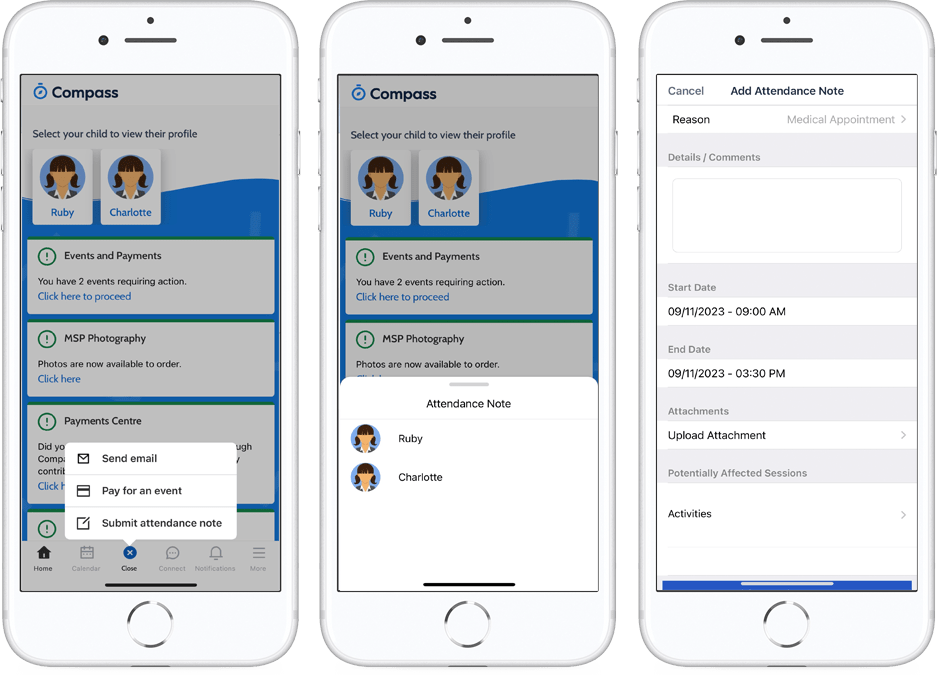
How to enter an attendance note:
From the homepage, click on the blue shortcuts button from the bottom taskbar
Click on ‘Submit Attendance Note’
Select the reason
Enter a brief description
Select start and finish
timeClick the ‘Save’ button